Showing posts with label update. Show all posts

Saturday, November 27, 2010

Easy Bills 1.6.4

A new update of easy bills has been pushed to the market. This update mainly focused on the interface. There have been many requests/suggestions for adding a filter or way to view paid/unpaid/or all bills for the month. I'm glad to say this feature is now available.

You'll notice the filter button in the upper left hand of the main screen. Just press it for options.

I've also moved the Add Bill button the main screen as well as the navigation buttons for moving between months.

Monday, October 11, 2010

Easy Bills Update 1.6.2

 I don't like publishing updates this close together but it was necessary. Someone sent in an issue that needed to be resolved. Just so you don't feel left out, I've fixed my poor spelling of "reoccuring" and added "BiMonthly" to the app.

Again if you find something with the app, please let me know. If you have any suggestions, email me.

Thursday, September 30, 2010

v1.6 Easy Bills Update

This update involved calendar sync and bill options. Now when you select the calendar, you'll be able to choose which one to sync with. This also allows you to create a custom "bills" calendar.

Biweekly and Quarterly have been included in the "Add Bill" screen. Also, introduced is the reoccurring option. This was added for the bills that happen every month and don't follow a payment schedule.

Thanks again for your interest in Easy Bills. If you have comments, question or complaints please email me and we'll discuss.

Wednesday, September 22, 2010

v1.4 Easy Bills Update

Thanks again for your support and comments. I hope you're enjoying the app and finding that it's actually helping you remember to pay those bills on time.

Easy Bills v1.4 brings syncing to Google Calendar. This feature is optional and defined in the settings within the Easy Bills. Addition of syncing is meant to be another visual reminder for your bills. Adding the Calendar widget or printing out the calendar might be helpful tips.

Notes of Interest:
  • Calendar Sync is all or nothing. Currently you don't have the option to only sync specific bills
  • Once Calendar Sync is on, all changes to bills will be reflected on your calendar.
  • Unpaid bills will read "BILL NAME Payment Due" Paid Bills will read "BILL NAME Paid"
  • You can "opt" in and out of this feature as much as you want. Depending on the size of changes being made, you may receive a notice from your phone saying the sync has exceeded it's limit and asking you to intervene. This is coming from Google and not Easy Bills.
  • Bill reminders are still handled by the app and not by Google Calendar. However in the future this might change.
  • Adding Items to your Calendar will not sync back to Easy Bills. This only supports a "push" method of sync.
  • If you have problems with Google Calendar right now then this might not work on your phone. I'm sorry.
Below are some images to help show you about the update.

The new settings screen displaying the calendar sync and the calendar name. Since Easy Bills only supports your main Google Calendar it's automatically chosen for you.
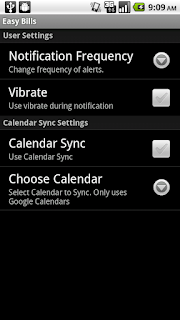


Depending on whether you're syncing or unsyncing you'll a see message of "Syncing to Calendar" or "Removing calendar events". This can be done as much as you want.


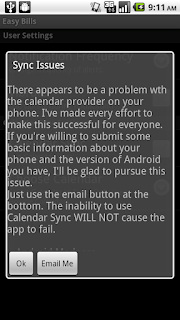
Finally if you see this screen it means something is wrong with your calendar or the method of connecting to your calendar isn't compatible with Easy Bills. Use the email button to send some simple diagnostic information and I'll see what needs to happen to achieve resolution.
Wednesday, September 8, 2010

Update

A new version of easy bills is available on the market. I believe this update enables you to have more flexibility and I'd hope you agree. First, editing and removal is now available. Perform a long press on a bill and you'll see the new options. Secondly, notifications were not customizable in the first version. Now you can determine how often they will be triggered and turn on/off a vibrate feature. You can access these settings by pressing the menu button on your phone while viewing the main screen.

  • Edit Bill - Change a bill amount and reminder options. This only changes the bill you selected.

  • Edit Series - Change every detail about the bill except for the name. This option takes all unpaid bills and updates the pay schedule based on the new information you provide. All previously paid bill retain their paid dates and amounts.

    For example you have a mortgage payment due on the 1st of the month. You refinance for a lower payment and change the due date of your payment. You would choose "Edit Series" and enter the new lower payment and change the due date. Press Save. You've now saved all your older entries, which you can export, and have changed your billing schedule. Please note the due date that displays on this screen is a projection based on your old schedule and last paid date.

  • Remove Bill - Removes that single bill from the month. If for some fortunate reason you don't have to pay it then remove it.

  • Remove Series - Completely removes all unpaid occurrences from the app.


If there's some other features you'd like to see added to this app, please let me know.

Thanks!